I am trying to use setFontSettings DXL function however the outcome is not what I expect. I have a level 5 object (Object Text and Heading) that I want to change font for. My original setting is set to TAHOMA... I want to change all level 5 objects to "Courier New" in order to avoid variable length characters and obtain fixed length characters. |
Re: Cannot change font properly via setFontSettings void setObjectTextToFixedWidthFontString(Object o, string fixedWidthText) { string fixedWidthRtfPrefix = //- "{\\rtf1\\ansi\\ansicpg1252\\deff0\\deflang1033{\\fonttbl{\\f0\\ftech Courier New;}}" string fixedWidthRtfContent = ""; string fixedWidthRtfSuffix = //- "}\n" //- "}"; o."Object Text" = richText( fixedWidthRtfPrefix //- fixedWidthText // fixedWidthRtfSuffix ); } |
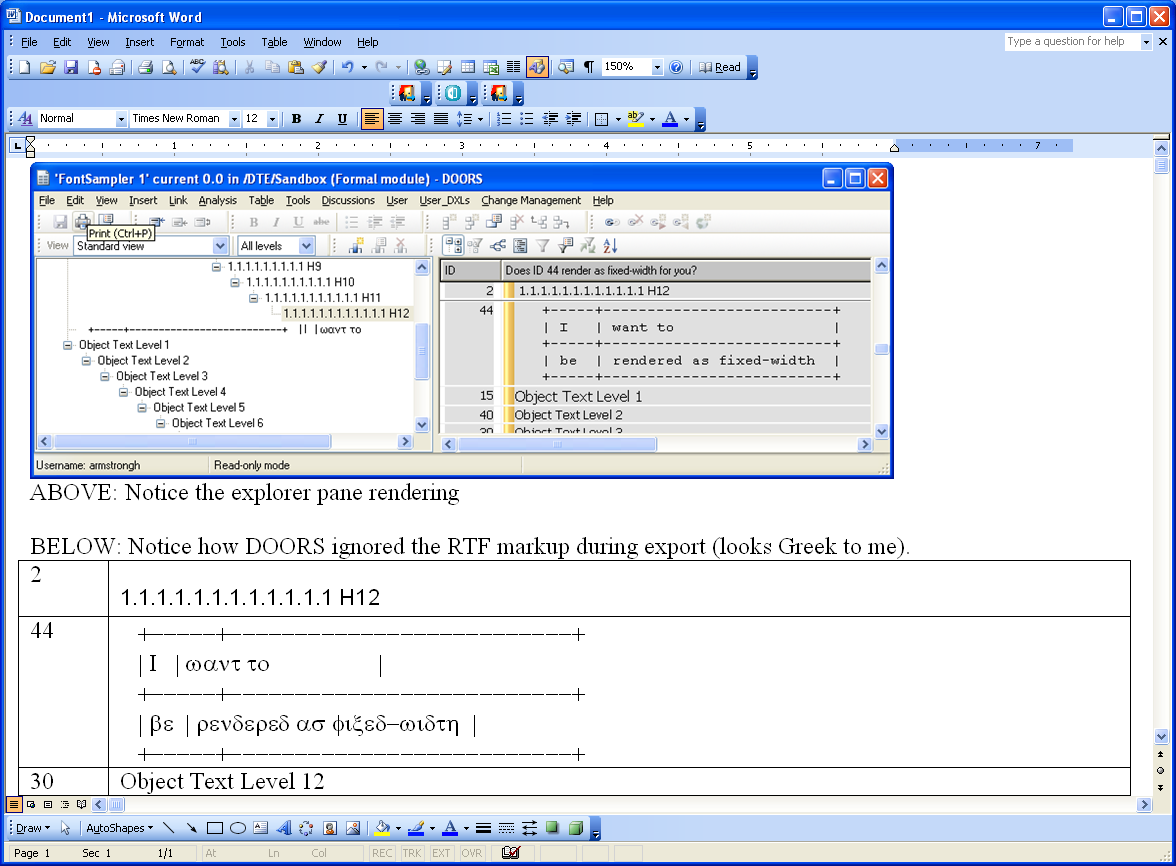
Re: Cannot change font properly via setFontSettings PatrickGuay - Tue Oct 04 12:56:31 EDT 2011 Examples: Get Object Text looking as you like. 1) Look at it in the Module Explorer. Does it render correctly there? 2) Try exporting it to Word. Did DOORS honor your RTF markup? I could really use this local font/size functionality too. I'm just advising that you take whatever you do for a ride around the block before you invest a lot of time prettying up your stuff. See attachment to see what I mean. Attachments attachment_14689618_DOORS_RTF.png |